Godot Jumpstart: Mini-Map HUD - [Silver Edition]
Jumpstart your godot project with a customizable 3D mini-map HUD for survival and exploration games built in Godot 4.5.
Add to your collection! Check out other tools and 'Jump Start' projects by clicking on "View all by poplava" (at top right).
Features
- Bronze Features:
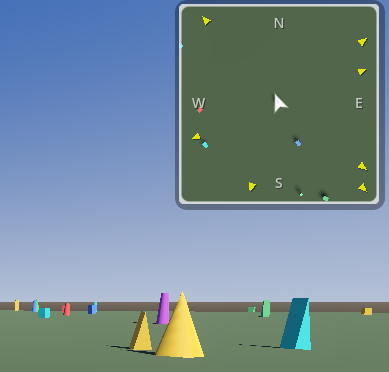
- SubViewport Rendering - Real-time overhead view of the game world
- Cardinal Directions - N, S, E, W indicators on map border
- Player Marker - 2D vector arrow showing position and facing direction
- Multiple View Modes - First Person, 2.5D angled, 3rd Person and Top-down perspectives.
- FPS Controller - Included player with WASD + mouse look
- Clean Code - Well-documented and easy to customize
- Silver Features:
- All Bronze Features
- POI Marker System - Add/remove markers with floating animated question marks
- Marker Types - Color-coded markers: objective, enemy, loot, friendly, waypoint
- Edge Arrows - Yellow triangles point to off-screen POIs at map border
- Zoom Controls - Mouse wheel zoom over minimap with min/max limits
- Configuration Dialog - Press M to adjust size, position, zoom, view mode, opacity
- Transparency - 15% transparent background for better immersion
- Visual Polish - Rounded corners, drop shadow, anti-aliased shader border
- Respawning Markers - Walk to a marker and it respawns randomly (demo)
Controls
| Input | Action |
|---|---|
| W/A/S/D | Move |
| Mouse | Look around |
| Shift | Sprint |
| Escape | Toggle mouse capture |
| V | Change camera perspective |
| M | Configure Minimap |
| Mouse Wheel | Zoom Minimap In/Out |
Quick Start
- Open project in Godot 4.5+
- Run the main scene
- Move around and watch yourself on the mini-map!
- Try V
- Try M
- Try mouse-wheel
Integration Guide
Using the Mini-Map in Your Project
- Copy these files to your project:
- scenes/minimap/minimap.tscn
- scenes/minimap/minimap.gd
- scenes/minimap/player_arrow.gd
- scenes/minimap/cardinal_indicator.gd
- Instance the mini-map in your UI:
var minimap = preload("res://scenes/minimap/minimap.tscn").instantiate() $CanvasLayer.add_child(minimap)
3. Connect your player:
# In your main scene func _ready(): minimap.set_player($Player)
Customization
Configure via Inspector or edit minimap.gd exports:
@export var map_size: Vector2i = Vector2i(200, 200) # Dimensions in pixels @export var screen_corner: ScreenCorner = ScreenCorner.TOP_RIGHT @export var margin: Vector2 = Vector2(16, 16) # Offset from edge @export var map_view: MapView = MapView.TOP_DOWN # Camera angle @export var camera_height: float = 50.0 @export var camera_ortho_size: float = 30.0 @export var show_cardinal_directions: bool = true @export var show_all_cardinals: bool = true # N only vs N/S/E/W
- Bronze Tier - Includes the base mini-map with player tracking
- Silver Tier - Includes bronze tier features. Adds POI markers, marker icons, zoom controls, and configuration dialog.
- You Are Here
- Gold Tier - Includes bronze & silver tier features. Adds variable terrain, fog of war, marker clustering, and dynamic marker updates.
- Coming Soon
License
- MIT License - Use freely in commercial and non-commercial projects.
Support
- Questions? Issues? Use the Poplava discord.
Purchase
In order to download this asset pack you must purchase it at or above the minimum price of $4 USD. You will get access to the following files:
Leave a comment
Log in with itch.io to leave a comment.